Security
Security model and limitations
What quickS3 protects and how, and the limits it doesn't hide, so you can decide for yourself what data belongs behind it.
OwnerAdmin
quickS3 lets people and AI clients use your storage without handing them the storage account or its keys. This page is what you need to judge whether that’s safe enough for your data.
What quickS3 does
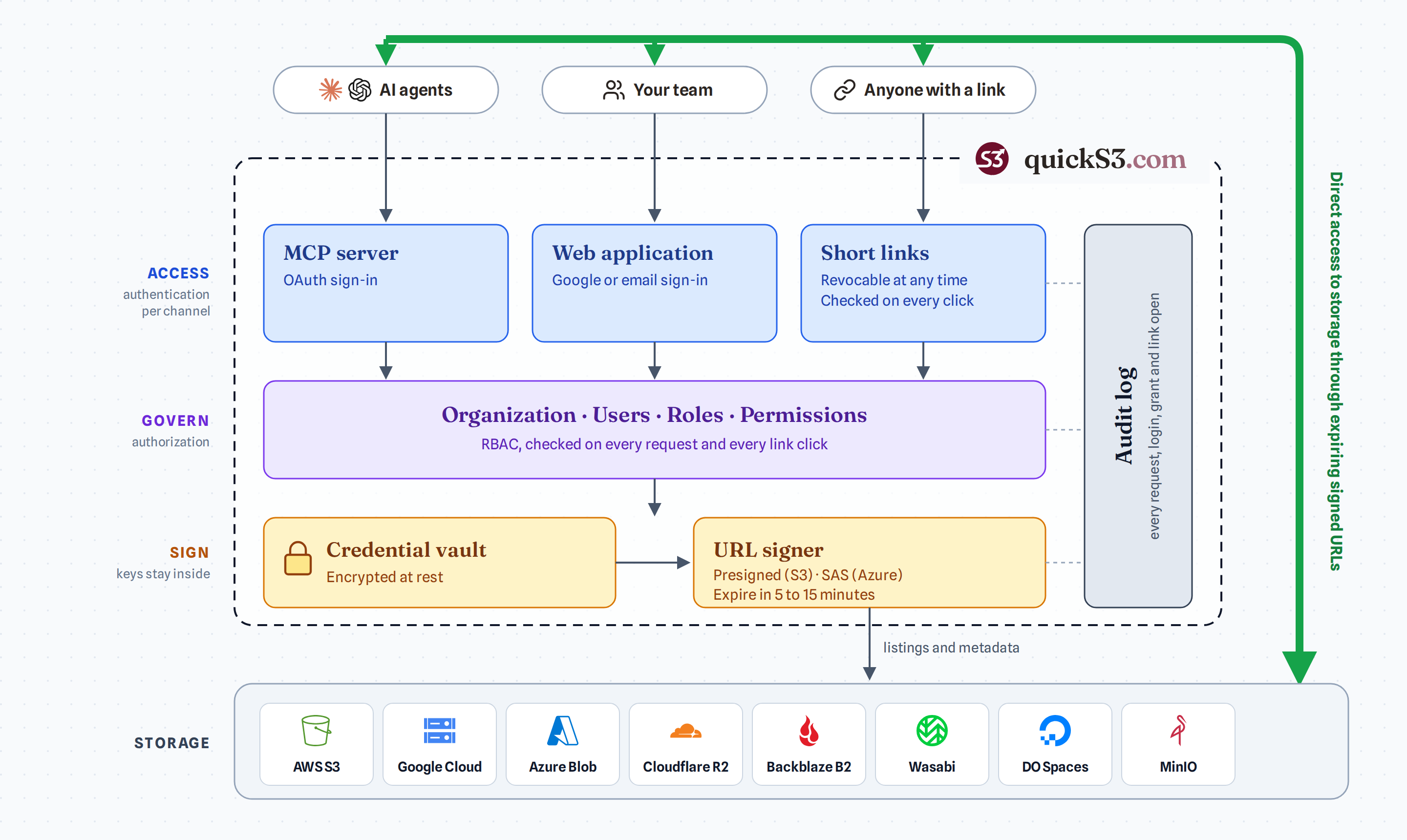
- Keeps organisations apart. Each organisation’s members, roles, connections, and audit log are stored separately. Nothing crosses from one to another.
- Checks every action. Each listing, download, upload, and delete is checked against the person’s current roles, with deny always winning. Removing someone or changing a role takes effect on their next action.
- Protects storage keys. Keys are encrypted with AES-GCM, used only on quickS3’s servers, and never sent to a browser or AI client. See how storage keys are protected.
- Keeps files out of its servers. Files move directly between people and your storage using short-lived signed links. See where your files travel.
- Protects sign-in. Session cookies are HTTP-only and secure, sign-up and sign-in are rate-limited, and passwords are stored only as hashes.
- Records what happened. Allowed and denied actions go into a 14-day audit log.
What’s up to you
- Scope the keys. quickS3 can only be as careful as the key you give it. A key limited to a few buckets limits the damage if anything goes wrong.
- Treat Owner as full trust. Owners manage keys and can reach every file. Keep the list short.
- Keep your own safety net. Turn on versioning or backups at your storage provider. quickS3 has no recycle bin and isn’t a backup product.
- Tidy up. Remove people who leave, revoke AI clients you no longer use, and keep share links short.
The Owner security checklist turns these into a list.
What quickS3 doesn’t do
- No temporary credentials. quickS3 uses long-lived access keys. It doesn’t support AWS role assumption, workload identity, or Azure Entra ID.
- No enterprise sign-in. No SAML, SCIM, or single sign-on beyond Google, and no two-factor authentication or passkeys yet.
- No conditional access. Read, Write, Delete, and Share are separate, but there are no conditions like IP ranges or times of day.
- No file inspection. No virus scanning or data-loss prevention.
- No long-term audit trail. Events are kept 14 days, and the log isn’t tamper-proof.
- No certifications. quickS3 has no SOC 2, ISO 27001, or similar certification, and makes no claim of fitness for regulated data.
If your data is regulated or highly sensitive, weigh these against your own requirements before you connect it.