Sign out
Sign out of this browser with Disconnect, what keeps working afterwards, and how to end your sessions in every other browser at once.
Select your initials at the top right of the app, then Disconnect. That signs you out of this browser.
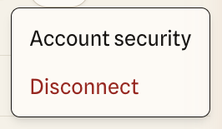
Other browsers where you’re signed in stay signed in. To sign out everywhere at once, change your password or another sign-in method in Account security. Any change there signs out your other sessions.
What keeps working
Signing out only ends your browser session. These carry on:
- AI clients you’ve connected keep their access until the grant expires or you revoke it.
- Share links you created keep working until they expire.
- Your memberships and roles don’t change.
Finish or cancel any uploads before you sign out. An interrupted upload has to be restarted.
Lost a laptop or phone?
Change your password (or add one) from Account security on another device, which signs out every other session. Then revoke your AI clients on the AI agents page, and ask an Owner or Admin to look through the audit log for anything you didn’t do.