Test and troubleshoot a connection
What Test connection checks at your storage provider, what each result means, and how to fix the errors it most often turns up.
Open Connections and select Test connection on the connection you want to check. Owners and Admins both have the button, so an Admin can check a connection without ever seeing its keys.
The test signs in to your provider with the stored key and lists the buckets, or just the ones in Bucket scopes if you set any. If automatic CORS updates are on, it also adds quickS3 to each bucket’s CORS rules where it’s missing, then checks that browsers are allowed to upload straight to those buckets. It takes a few seconds and never touches your files.
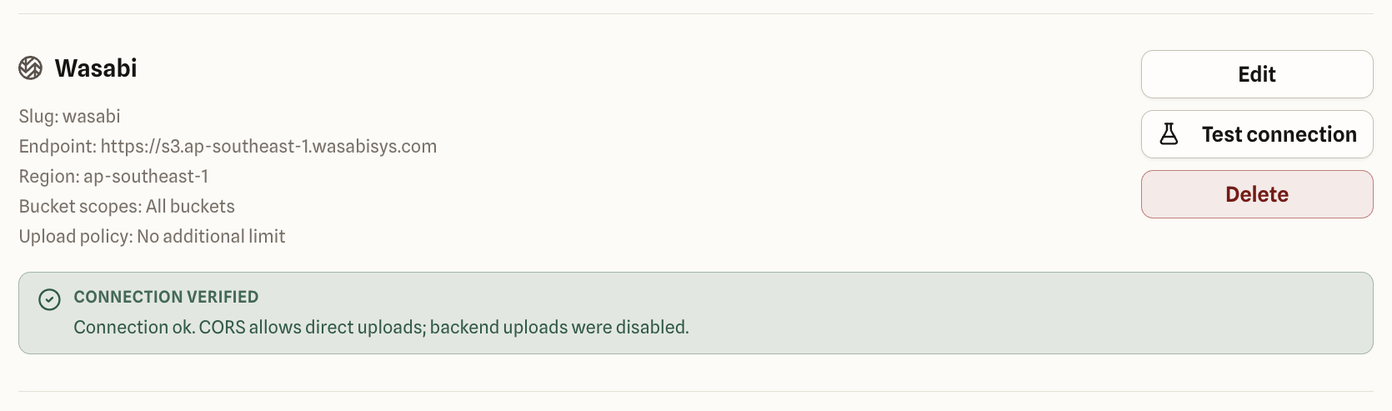
Reading the result
Connection verified (green). Everything works. If the message adds “CORS allows direct uploads; backend uploads were disabled”, browsers can upload straight to your buckets, so quickS3 turned off the slower route through its own servers.
Connection verified with warning (amber). The key works, so people can browse and download, but the message says CORS doesn’t allow quickS3 for uploads. Uploads from the browser will fail until that’s fixed. See browser uploads and CORS.
Connection check failed (red). quickS3 couldn’t use the connection. The message tells you why, and ends with a short code in brackets.
Fixing a failed test
| The message says | What to check |
|---|---|
| Authentication failed. Check the access key and secret. | The key was mistyped, deleted, or disabled at the provider. On Azure, check the storage account name and account key. |
| Credentials are valid but not authorized to access this storage provider. | The key exists but lacks permission. Give it list and read access at the provider, then test again. |
| This token cannot list buckets. Enter the bucket scopes it should access. | Your key is limited to certain buckets and can’t list them all. That’s fine: edit the connection and type the bucket names into Bucket scopes. |
| We couldn’t access bucket “…”. Confirm the bucket exists and the token has access. | A name in Bucket scopes is misspelled, doesn’t exist, or is outside what the key can reach. |
| The endpoint or region is incorrect. | The region doesn’t match where the bucket lives, or the endpoint is wrong. Copy both from your provider’s console. |
| We could not reach that endpoint. | quickS3 couldn’t connect to the address. Check the endpoint URL. For MinIO or other self-hosted storage, it must be reachable over HTTPS from the internet. |
| The storage provider returned an internal error. | The problem is on the provider’s side. Check their status page and try again later. |
| We could not validate this connection. | Something else went wrong. Check the details, then contact support with the code. |
An Admin can’t change the key, so if the fix involves the connection’s settings, pass the message to an Owner. Only Owners can edit a connection.
Asking for help
If you’re stuck, send support the code shown in brackets at the end of the error, the provider, and roughly when you ran the test. Never send your access key or secret. Nobody needs them to diagnose a connection, including us.