Work with multiple organisations
Switch between organisations, or create a new one for a separate team, client, or environment. Nothing at all is shared between two of them.
An organisation is a separate workspace with its own people, connections, roles, audit log, and AI clients. Nothing is shared between two organisations, even if you’re in both. A bucket called assets in one has nothing to do with a bucket called assets in another.
Your account came with one organisation. You’ll see more if people invite you into theirs, or if you create some yourself.
Switch organisation
Select the organisation name at the top right of the app and pick another one from the list. The checkmark shows which one you’re in, and your role (Owner or Admin) appears next to each name.
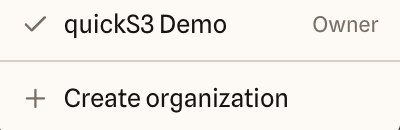
Everything in the app follows the switch: Buckets, People, Roles, the audit log, and so on. Before you upload or delete something, glance at the name to make sure you’re in the right place.
Create an organisation
- Open the switcher and select Create organization.
- Enter a name and select Create organization.
You become its Owner, and quickS3 switches you into it right away. It starts empty, with no connections, roles, or people. Nothing is copied from the organisation you were in, so connect storage and set up roles as you would the first time.
You can create up to five organisations an hour.
When to use a separate organisation
Create a new one when you need a hard wall. That might be one per client, when each client’s files and people must never mix, or a separate organisation for test storage so experiments stay out of the production audit log.
If the same people share the same storage and you only want to limit who sees which folders, one organisation with roles is simpler.