Connect AWS S3
Create an IAM user and policy for quickS3 in the AWS console, then paste its access key in to connect your S3 buckets. About ten minutes.
You’ll create an IAM user for quickS3 in the AWS console, give it a policy that covers your buckets, and paste its access key into quickS3. Allow about ten minutes.
1. Create an IAM user and policy
In the AWS console, open IAM, create a user just for quickS3 (for example quickS3), and attach a policy like this one. Replace my-bucket with your bucket name, and repeat the two Resource lines for each bucket.
{
  "Version": "2012-10-17",
  "Statement": [
    {
      "Sid": "ListAllBuckets",
      "Effect": "Allow",
      "Action": "s3:ListAllMyBuckets",
      "Resource": "*"
    },
    {
      "Sid": "BucketLevel",
      "Effect": "Allow",
      "Action": ["s3:ListBucket", "s3:GetBucketCORS", "s3:PutBucketCORS"],
      "Resource": "arn:aws:s3:::my-bucket"
    },
    {
      "Sid": "ObjectLevel",
      "Effect": "Allow",
      "Action": ["s3:GetObject", "s3:PutObject", "s3:DeleteObject", "s3:AbortMultipartUpload"],
      "Resource": "arn:aws:s3:::my-bucket/*"
    }
  ]
}
What each part is for:
s3:ListAllMyBucketslets quickS3 show all your buckets on Buckets. Drop it if you’d rather list the buckets yourself in Bucket scopes.s3:ListBucketands3:GetObjectare needed to browse, preview, and download.s3:PutObject,s3:DeleteObject, ands3:AbortMultipartUploadare needed for uploads, deletes, new folders, and cancelling large uploads. Leave them out for a read-only connection.s3:GetBucketCORSands3:PutBucketCORSlet quickS3 set up browser uploads for you. Leave them out if you’ll set CORS yourself.
Add s3:CreateBucket (on "Resource": "*") only if Owners should be able to create buckets from quickS3.
Then open the user’s Security credentials tab and create an access key. AWS shows the secret once, so keep the page open until you’ve pasted it into quickS3.
2. Add the connection
- In quickS3, open Connections, select New connection, and pick AWS S3.
- Enter a Name.
- In Endpoint, enter the S3 address for your bucket’s region,
https://s3.<region>.amazonaws.com. For a bucket in Paris, that’shttps://s3.eu-west-3.amazonaws.com. - In Region, enter the same region code, like
eu-west-3. Don’t leave it empty: AWS rejects requests signed for the wrong region. - Paste the Access key ID and Secret access key. Leave Session token empty unless you’re using temporary credentials.
- Keep CORS updates on and select Connect provider.
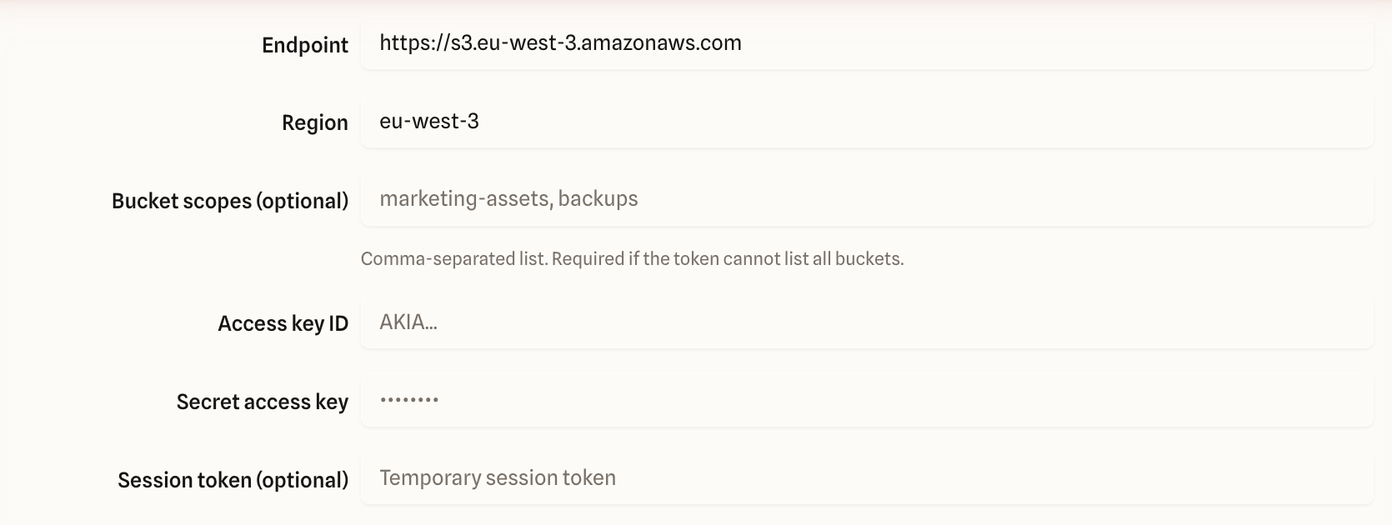
Then select Test connection. You want to see Connection verified with “CORS allows direct uploads”. If something’s wrong, the error table says what to check.
Buckets in several regions? Add one connection per region.
Setting CORS yourself
If your team manages bucket CORS rules itself, switch off CORS updates and add this rule to each bucket in S3 → your bucket → Permissions → Cross-origin resource sharing (CORS). Keep any rules already there.
[
  {
    "AllowedOrigins": ["https://quicks3.com"],
    "AllowedMethods": ["GET", "HEAD", "PUT"],
    "AllowedHeaders": ["*"],
    "ExposeHeaders": ["ETag"],
    "MaxAgeSeconds": 3600
  }
]
Browsers need ETag to finish large uploads. Deletes don’t go through the browser, so DELETE isn’t needed. Never make a bucket public to fix an upload problem. Run Test connection again after saving.
Common problems
- No buckets on Buckets. The policy has no
s3:ListAllMyBuckets. Add it, or type the bucket names into Bucket scopes. - “The endpoint or region is incorrect”. The endpoint or region doesn’t match where the bucket lives. Check the bucket’s region in the S3 console.
- Browsing works but uploads fail. The policy is missing
s3:PutObject, or CORS isn’t set. Run Test connection to see which.