How AI agents reach S3: MCP servers compared
Most S3 MCP servers need an access key and a local install on every computer. We compare them with quickS3 on keys, installs, per-agent scope, file privacy, revocation and real cost.
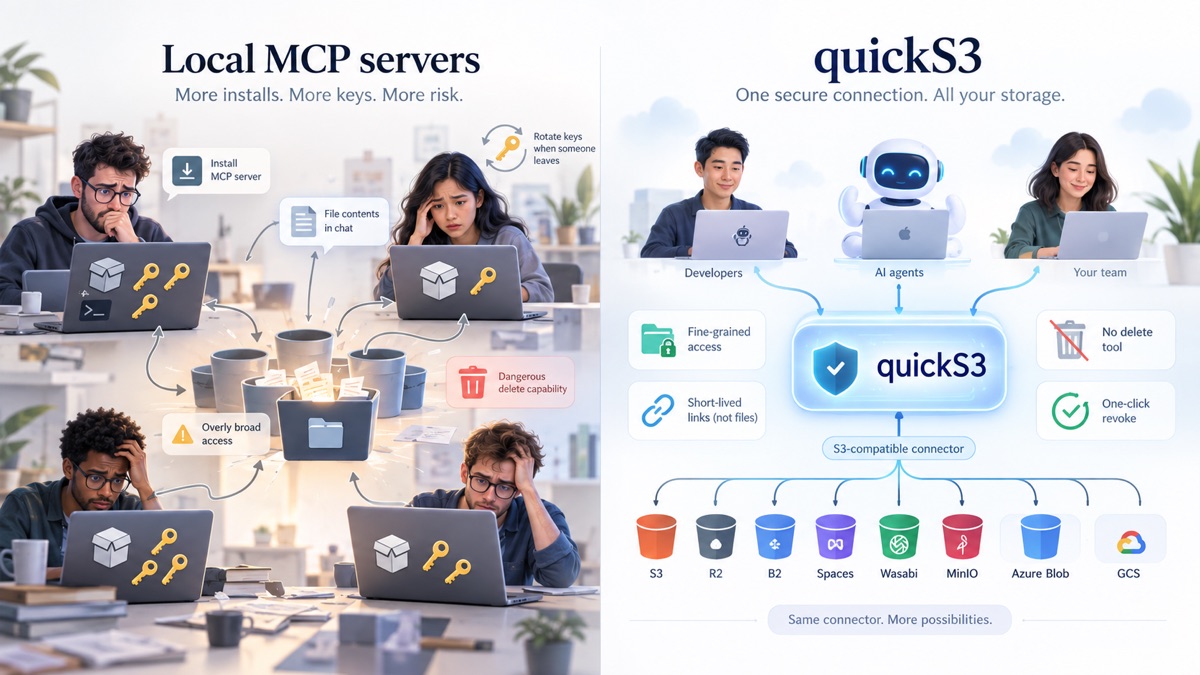
Your team wants Claude, Codex or ChatGPT to work with the files in your buckets. Search for “S3 MCP server” and you’ll find plenty of options. Most of them quietly ask for two things before they work:
- An S3 access key, stored on the computer where the agent runs.
- A piece of software installed and kept running on that same computer.
For one developer poking at a personal bucket, that’s fine. For a team, it means handing out storage keys to every laptop and asking every person to install and update a server they don’t understand. quickS3 was built to remove both steps.
This post compares quickS3 with the main alternatives: open-source servers like txn2/mcp-s3, mcp-server-cloud-fs, Silo MCP and OpenDAL MCP, vendor servers from Backblaze, Wasabi, Microsoft and AWS, and integration platforms like StackOne and Pipedream. All details come from each project’s public documentation as of September 2026.
At a glance
| Typical S3 MCP server | quickS3 | |
|---|---|---|
| Storage keys | On every user’s computer | Encrypted in quickS3, never shared |
| Install | Runs on every user’s computer | Nothing. Add a URL, sign in |
| Works in Claude on the web and ChatGPT | No | Yes |
| What the agent can reach | Whatever the key allows | Roles you pick, down to a folder |
| File contents | Often returned into the chat | Never. The agent gets a link |
| Delete tool | Usually | None |
| Someone leaves | Rotate the key everywhere | Remove them. Their agents stop |
| Providers | Usually one | 8, including Azure Blob and GCS |
| Managed in | Config files and IAM policies | A web app |
Problem 1: every agent needs a copy of your keys
A local S3 MCP server talks to your storage with your credentials. So the credentials have to be wherever the server runs, which is usually the laptop of whoever uses the agent.
| Tool | Where the storage credentials live |
|---|---|
| txn2/mcp-s3 | Config or environment on each user’s machine |
| OpenDAL MCP | Config or environment on each user’s machine |
| Backblaze B2 MCP | Local config in the standard setup |
| Silo MCP | The OS keyring on each user’s machine |
| DigitalOcean MCP | An API token pasted into each client’s config |
| AWS API MCP Server | The AWS profile on each user’s machine |
| mcp-server-cloud-fs | The server you deploy and operate |
| quickS3 | Encrypted in quickS3. Users never see them |
Picture a team of ten, each with Claude Code or Cursor. With a local server, that’s ten copies of an access key in ten config files, synced to backups and dotfile repos, readable by any other tool on those machines. DigitalOcean’s own documentation warns that MCP clients often keep tokens in config files you need to protect. When someone leaves, or a laptop goes missing, you rotate the key and hand the new one to the nine people who stayed.
It’s rarely a narrow key, either. Creating one key per person, per bucket and per folder is tedious, so teams tend to share one that reaches far more than any single agent needs. DigitalOcean notes that newly created Spaces keys have full access by default.
Silo deserves credit for moving keys into the OS keyring, and cloud identities (Azure managed identities, AWS SSO) avoid static keys for teams already set up for them. But the key or identity still has to exist on each machine, and someone still has to set it up there.
With quickS3, an owner connects a bucket once. The keys are encrypted and stay on our side. Each person signs in with Google or email, and their agent signs in through their browser with OAuth. There’s nothing to copy, and nothing to leak from a laptop.
Problem 2: every computer needs to run a server
A local MCP server is a program. Someone has to install it along with its runtime (Node, Python, Go, .NET or Docker, depending on the project), wire it into each AI client, and update it on every machine.
That’s often not an option:
- Company laptops frequently block installing software without IT approval.
- People in marketing, finance or ops want Claude to fetch a report, not to edit a JSON config and debug a Python path.
- Claude on the web and ChatGPT custom connectors can’t start a local process at all. They only talk to remote MCP servers.
- Every installed copy is one more thing to patch when a vulnerability shows up.
| Tool | Software on the user’s computer? | Hosted for you? |
|---|---|---|
| txn2/mcp-s3 | Yes | No |
| OpenDAL MCP | Yes | No |
| Silo MCP | Yes | No |
| Backblaze B2 MCP | Yes, or a server you host | No |
| Azure MCP Server | Yes, or a server you host | No |
| AWS API MCP Server | Yes, or a server you host | No |
| mcp-server-cloud-fs | Yes, or a server you host | No |
| quickS3 | No | Yes |
You can skip the per-computer install by hosting one of these servers centrally. mcp-server-cloud-fs is the most complete option for that, with OAuth 2.1 and support for external identity providers. But then your team runs an internet-facing service that holds storage credentials, and owns its TLS, OAuth setup, identity provider integration, secrets, logs, upgrades and incident response. AWS even says its API MCP Server’s HTTP mode is meant for a single customer, not for serving several users.
quickS3 is a remote MCP server at https://quicks3.com/mcp. You add that URL as a connector and sign in. It works in Claude Code, Codex, Claude on the web and desktop, Cowork and ChatGPT and other clients. Chat apps can browse your folders and create share links, and clients that can run commands, like Claude Code and Codex, also move files. For those two there’s an open-source plugin that sets everything up in two commands.
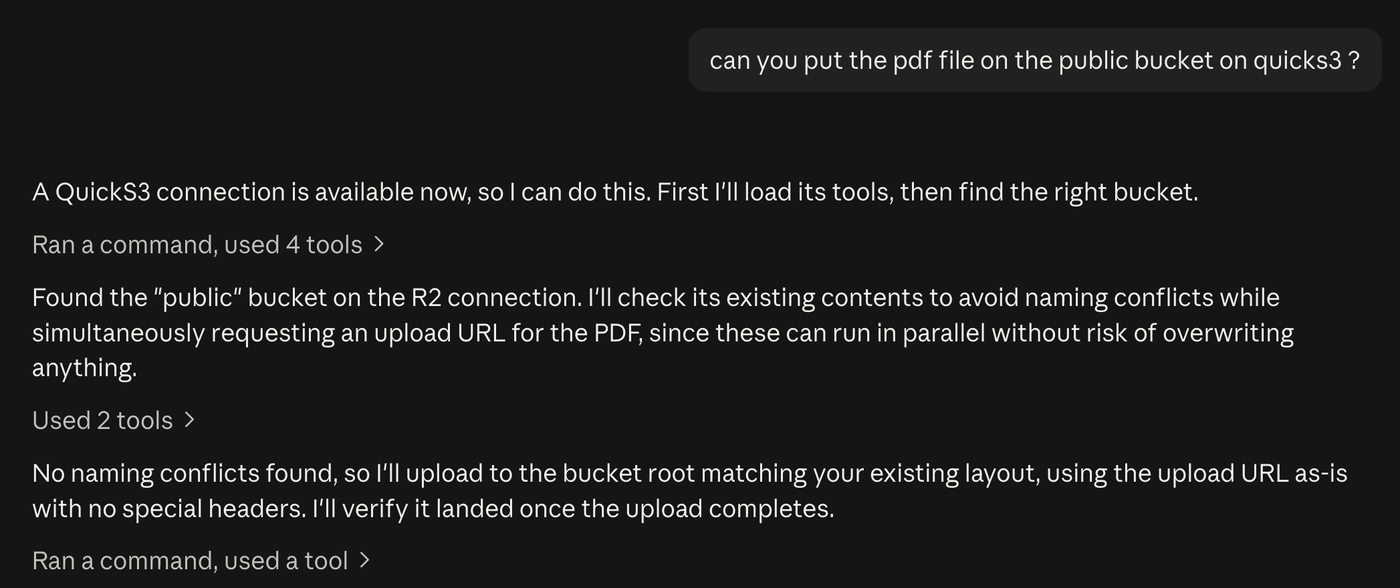
Problem 3: the agent gets all of your access, or none
With a key-based server, the agent can do whatever the key can do. Some servers add useful limits: txn2 has a read-only mode and prefix ACLs, and cloud-fs has OAuth scopes such as read, write and delete. Whoever configures the server sets those limits, and they apply to everyone using it.
quickS3 lets each person decide what each of their agents can touch. When you connect a client, you see the consent page:
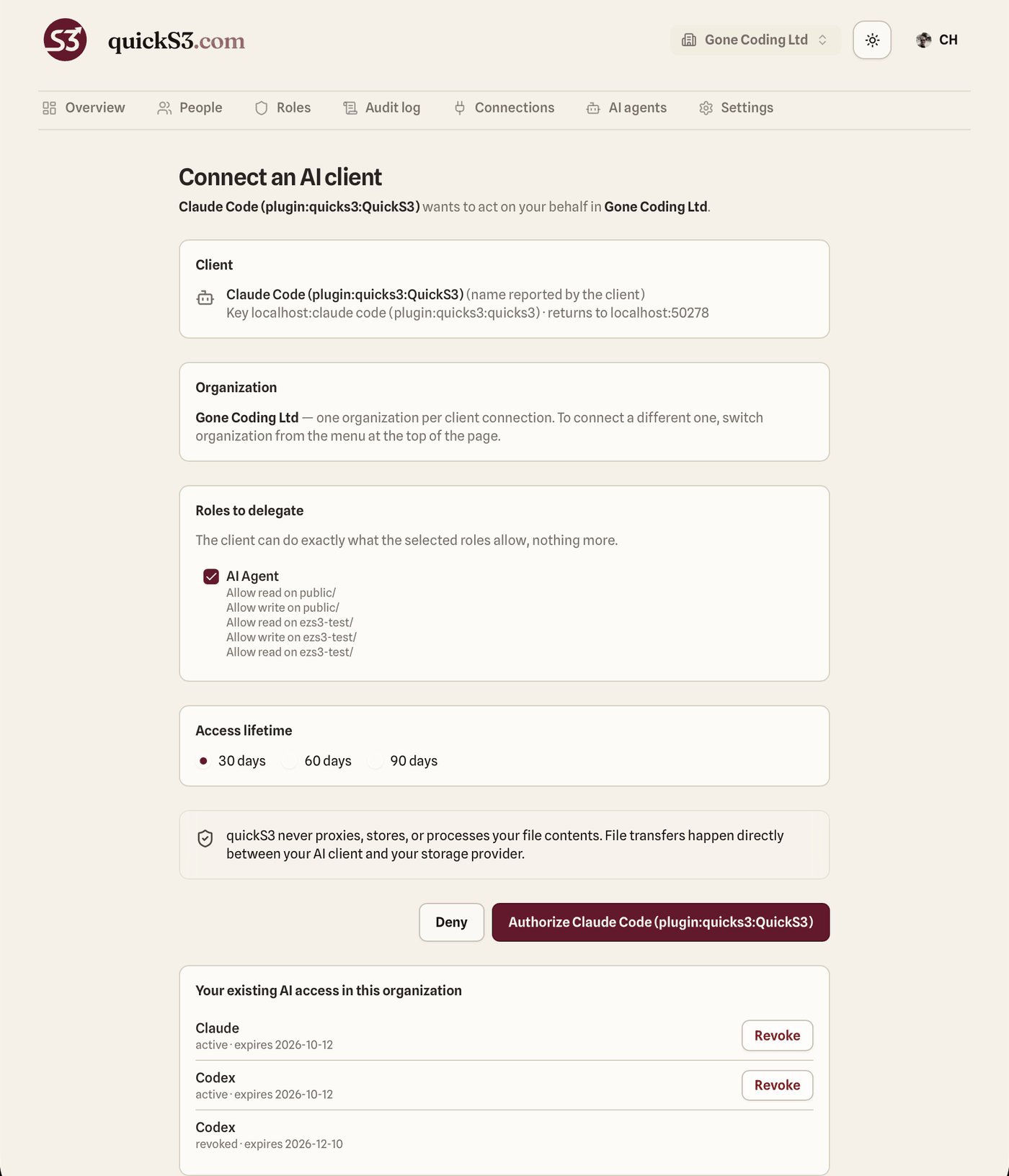
You tick the roles this agent may use and choose how long the access lasts. We didn’t find this combination in any other storage MCP:
- Each agent gets its own grant. Claude Code can write to
reports/while Codex only readsbuilds/. - Rules work on connection, bucket and folder, with allow and deny. Deny always wins.
- An agent can never do more than the person who approved it, and it can’t use Owner or Admin rights.
- Access expires after 30, 60 or 90 days.
- Every tool call checks the current rules. Tighten a role and every agent using it follows on its next call.
Setup takes about five minutes. See Set up an AI Agent role, or the agent role docs.
The closest thing elsewhere is StackOne, which gives each employee a personal MCP endpoint under central policies. It’s a broad platform for hundreds of apps, and its documentation describes policies at the connector and action level rather than bucket and folder rules, including for its Amazon S3 connector.
Problem 4: your files end up in the chat
Many storage MCP servers behave like a file system. The agent calls read_file or get_object, the server downloads the object, and the file comes back inside the tool result. Now it’s in the conversation, and in whatever the client sends to the model.
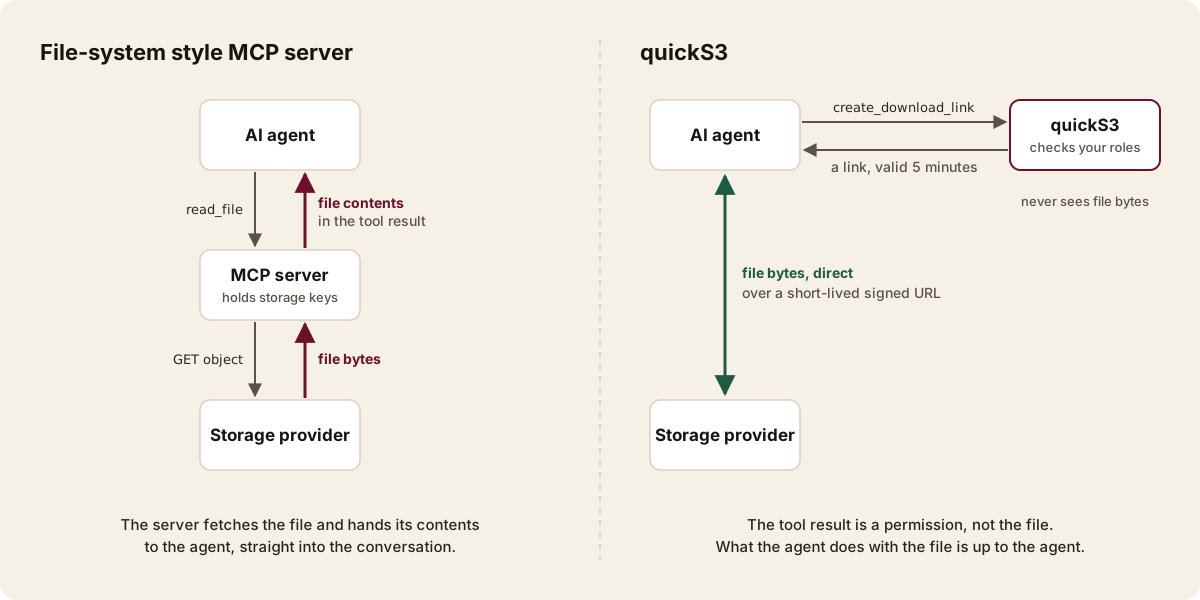
quickS3 never returns file contents. When an agent asks for a file, it gets a link:
{
  "url": "https://quicks3.com/t/…",
  "transferId": "tr_…",
  "expiresAt": "2026-09-17T12:05:00Z"
}
The link works once, for five minutes. When the agent opens it, quickS3 checks access again, logs the download, and redirects to a short-lived URL signed by your provider. The file comes straight from your storage. Uploads work the same way with a presigned URL. quickS3 never proxies, stores or processes your files, and the agent only downloads what it actually needs. How AI file transfers work and Where your files travel have the details.
| Tool | Read tool returns the file? | Write tool takes the file? |
|---|---|---|
| txn2/mcp-s3 | Yes | Yes |
| mcp-server-cloud-fs | Yes | Yes |
| OpenDAL MCP | Yes | Not documented |
| Backblaze B2 MCP | Yes, for small files | Yes, for small files |
| Silo MCP | Saves to a local path | Reads a local path |
| Azure MCP Server | No download tool documented | Reads a local path |
| Wasabi hosted MCP | No | No |
| quickS3 | No, returns a link | No, returns an upload URL |
Some of these servers also offer presigned URLs. That helps, but when the same server has a read_file tool, the agent is free to pick the one that puts the file in the chat. quickS3 doesn’t offer that choice. Wasabi’s hosted MCP follows the same principle, for Wasabi storage only.
Problem 5: one prompt injection away from a deleted bucket
A file an agent reads can contain instructions aimed at the agent. So it matters what the agent is able to do if it gets fooled.
txn2 exposes delete and copy tools. cloud-fs has a delete scope and even a shell scope. The AWS API MCP Server runs AWS CLI commands, and its README warns about prompt injection. You can switch these off, if you remember to, on every install.
quickS3 has six tools: list connections, list buckets, list objects, create a download link, create a share link and create an upload URL. There’s no delete, copy, move or rename tool to switch off. Uploads refuse to replace an existing file unless the agent asks to overwrite and its role allows writing there.
Problem 6: someone leaves, and you rotate everything
| Tool | Cutting off one person’s agent | Audit |
|---|---|---|
| Local servers with keys | Rotate the shared key everywhere | Provider logs, if enabled |
| mcp-server-cloud-fs | Revoke the token on your OAuth server | JSON log on your server |
| Azure and AWS servers | Change RBAC or IAM for that identity | Azure logs, CloudTrail |
| quickS3 | One click on the AI agents page | Per-agent entries in the audit log |
In quickS3, every agent action appears in the audit log next to the person who approved it. Revoke a grant and the next call fails, along with any download links the agent hasn’t used. Owners and admins can revoke anyone’s agent, for example when a laptop is lost. Remove a person from the organization and all their agents stop working. Nobody else has to change anything.
Problem 7: access rules live in config files
With the other tools, access control is spread across text files and consoles. Credentials sit in environment variables or a JSON config on each machine. Prefix restrictions and read-only switches go in the server’s own config. The real permissions are IAM policy documents in each provider’s console. To answer “who can reach the payroll folder, and through which agent?”, you’d have to read all of them, on every machine.
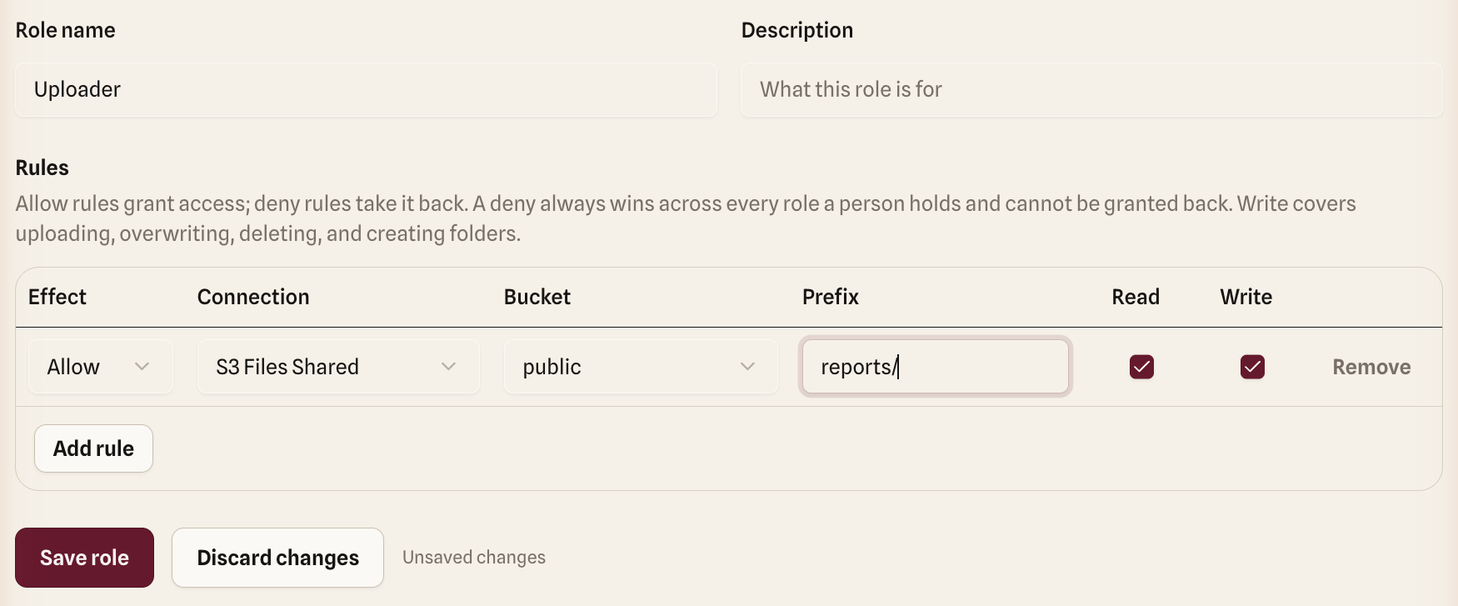
quickS3 puts all of it in one web app:
- Connections: add a bucket on any provider once, and test it.
- Roles: write rules as a table of connection, bucket, folder, read and write, starting from templates like Read-only or Uploader.
- People: invite teammates and tick the roles each one holds.
- AI agents: see every connected client, its roles and its expiry date, and revoke it. Owners see everyone’s.
- Audit log: filter what people and agents did, and export it.
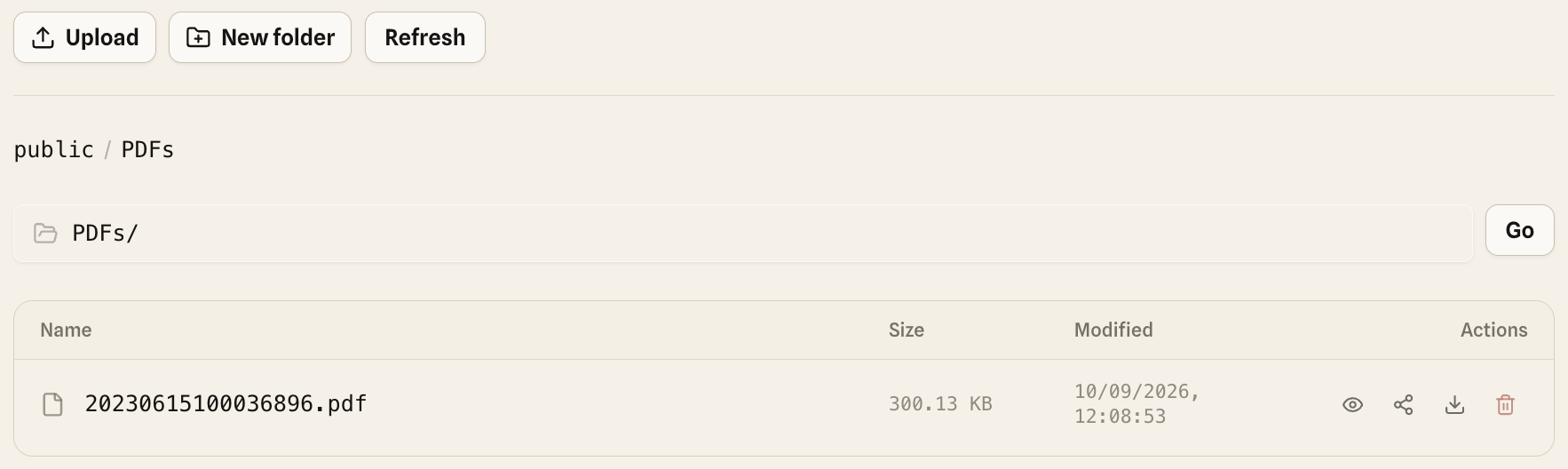
The same app is also a file browser for your team. People who don’t use an AI agent can browse, preview, upload, download and share files under the same roles, without a storage console or a desktop client.
One connector for all your storage


Vendor servers only cover their own storage. Wasabi’s MCP works with Wasabi, Backblaze’s with B2, Azure’s with Azure. If your data sits with two or three providers, that’s two or three servers, each with its own setup and its own permission model.
| Tool | Storage it covers |
|---|---|
| Backblaze B2 MCP | Backblaze B2 |
| Wasabi hosted MCP | Wasabi |
| Azure MCP Server | Azure |
| AWS MCP Server | AWS |
| txn2/mcp-s3 | AWS S3 and S3-compatible |
| quickS3 | AWS S3, R2, B2, Spaces, Wasabi, MinIO, Azure Blob, GCS |
One quickS3 connector covers every connection in your organization, with the same roles everywhere. An agent can list a Wasabi bucket and upload to R2 in the same conversation.
What it really costs
Most S3 MCP servers are free to download. They aren’t free to run for a team.
Count the hours: installing and configuring the server on each computer, creating and handing out keys, rotating them when people leave, keeping every copy updated, and, if you centralize it, running and securing an OAuth service. For a team of ten, one afternoon of an engineer’s time on that already costs more than a year of quickS3.
| Option | What you pay |
|---|---|
| Open-source local servers | No license fee, plus setup and keys on every computer |
| Self-hosted gateway | No license fee, plus hosting, identity provider and ops |
| StackOne | Team plan at $600/month |
| quickS3 | $19/month for 10 users, then $2/user. 14-day free trial |
AI agents never count as users in quickS3, so each person can connect as many agents as they like.
When a local server is enough
If you’re a solo developer with a personal bucket and you want the model to read files directly, a local server like txn2/mcp-s3 does the job. If your company runs everything on Azure with managed identities, Microsoft’s Azure MCP Server fits that world. quickS3 is for the other case: a team, shared buckets, and people who shouldn’t need a storage key or an install to use their AI agent. Our security model page spells out exactly what quickS3 covers.
Why teams pick quickS3
- No storage keys on anyone’s computer.
- Nothing to install. It works in Claude Code, Codex, Claude on the web, Cowork and ChatGPT.
- Each agent gets only the roles its person chooses, down to one folder, for a limited time.
- File contents never pass through quickS3 or come back in a tool result.
- No delete tool, and no silent overwrites.
- One click to revoke an agent, and every action in the audit log.
- A web app for connections, roles, people and agents, instead of config files.
- One connector for AWS S3, R2, B2, Spaces, Wasabi, MinIO, Azure Blob and GCS.
See how the quickS3 S3 MCP server works, then connect Claude Code or Codex to your first bucket. It’s free during the beta, and setup takes about ten minutes. New to quickS3? Start with AI clients and quickS3.
Read next

Connect Claude Code to your S3 buckets with quickS3
Add the quickS3 plugin to Claude and Claude Code, choose which roles it may use, and let your AI agent browse, upload, and download files in your S3 buckets.

Connect Codex to your S3 buckets with quickS3
Install the quickS3 plugin in Codex, choose which roles it may use, and let your AI agent browse, upload, and download files in your S3 buckets.

Set up an AI Agent role in quickS3
Create a dedicated role for your AI agent, assign it to yourself, and delegate it to Claude Code or Codex. Plus why an owner can't hand over the Owner role.