Remote MCP server
S3 MCP server for Claude, ChatGPT, Codex, and any MCP client
Let an AI agent list, download, and upload files in your S3-compatible buckets without putting access keys on anyone's laptop. quickS3 is a hosted MCP server: the agent signs in through your browser, gets only the roles you pick, and moves files straight to and from your storage provider.
MCP server URL
https://quicks3.com/mcpStreamable HTTP with OAuth sign-in. No API key, no local install.
Why remote
A local S3 MCP server needs your keys
Most S3 MCP servers run on your machine and read an access key from a config file. Each laptop then holds a long-lived credential, often with far more access than the agent needs, for a single provider. They also don't work in claude.ai, ChatGPT, or Cowork, which only connect to remote servers. quickS3 keeps the credential on its side and hands the agent a scoped, revocable grant instead.
| Topic | Typical local S3 MCP server | quickS3 |
|---|---|---|
| Credentials | Access keys in a config file on every machine | None on the machine. The agent signs in through your browser |
| Scope | Whatever the key allows, often a whole account | Only the roles you delegate, down to one folder |
| Providers | Usually one | AWS S3, R2, B2, Spaces, Wasabi, MinIO, Azure Blob |
| Clients | Desktop apps that can start a local process | Any remote MCP client, including claude.ai, ChatGPT, and Cowork |
| File contents | Often returned into the chat | Short-lived links; bytes go straight to your provider |
| Revoking | Rotate the key everywhere it was copied | One click; the next call fails |
| Audit | Provider logs, if you turned them on | Per-agent entries in the quickS3 audit log |
Setup
Connect an agent in three steps
- 1
Connect your storage and create an agent role
Add a storage connection in quickS3 (see the guides for AWS S3,Cloudflare R2, andother providers). Then create a custom role that allows only the buckets and folders the agent needs, and assign it to yourself.How to set up an AI agent role.
- 2
Add quickS3 to your AI client
View on GitHubquickS3 plugin for Claude Code and Codex
QuickS3-com/skillOpen source, MIT
The recommended setup. The plugin adds the quickS3 MCP server and the
quicks3-operatorskill, which teaches the agent to list folders narrowly, download through short-lived links, and upload without overwriting by default.Claude Code
/plugin marketplace add QuickS3-com/skill/plugin install quicks3@quicks3Then run /mcp, choose QuickS3, and sign in when your browser opens.
Claude Code guide with screenshotsCodex
codex plugin marketplace add https://github.com/QuickS3-com/skill.gitcodex plugin add quicks3@quicks3Codex then opens your browser to sign in.
Codex guide with screenshotsClaude app (web, desktop, Cowork)
Open Settings → Connectors, choose Add custom connector, name it quickS3, and paste the server URL:
https://quicks3.com/mcpOptional: add the
Step-by-step guide with screenshotsquicks3-operatorskill from theGitHub repo in Settings → Capabilities → Skills.ChatGPT
Add a custom connector in ChatGPT's settings, paste the server URL, and choose OAuth as the authentication:
https://quicks3.com/mcpChatGPT then opens quickS3 so you can approve it.
Claude Code or Codex, server only
To skip the skill, add just the MCP server:
claude mcp add --transport http quicks3 https://quicks3.com/mcpcodex mcp add quicks3 --url https://quicks3.com/mcpcodex mcp login quicks3In Claude Code, run
/mcpto sign in. In Codex, the login command opens your browser.Any other MCP client
Add a remote server with the URL above, using the Streamable HTTP transport. The client discovers the OAuth sign-in by itself; there is no API key or header to set.
To download or upload, the client must be able to run a command such as
curl. Chat-only clients can browse folders and create share links.The skill is a plain
SKILL.mdin theGitHub repo. Copy it into any agent that reads skills. - 3
Approve it in your browser
The client opens the quickS3 consent page. Tick the roles the agent may use and choose how long the access lasts: 30, 60, or 90 days. Only your own custom roles are listed. Owner and Admin never appear, so an agent can't manage your team or reach every bucket.
That's it. Ask the agent to "list the folders I can access in quickS3" to check the connection.
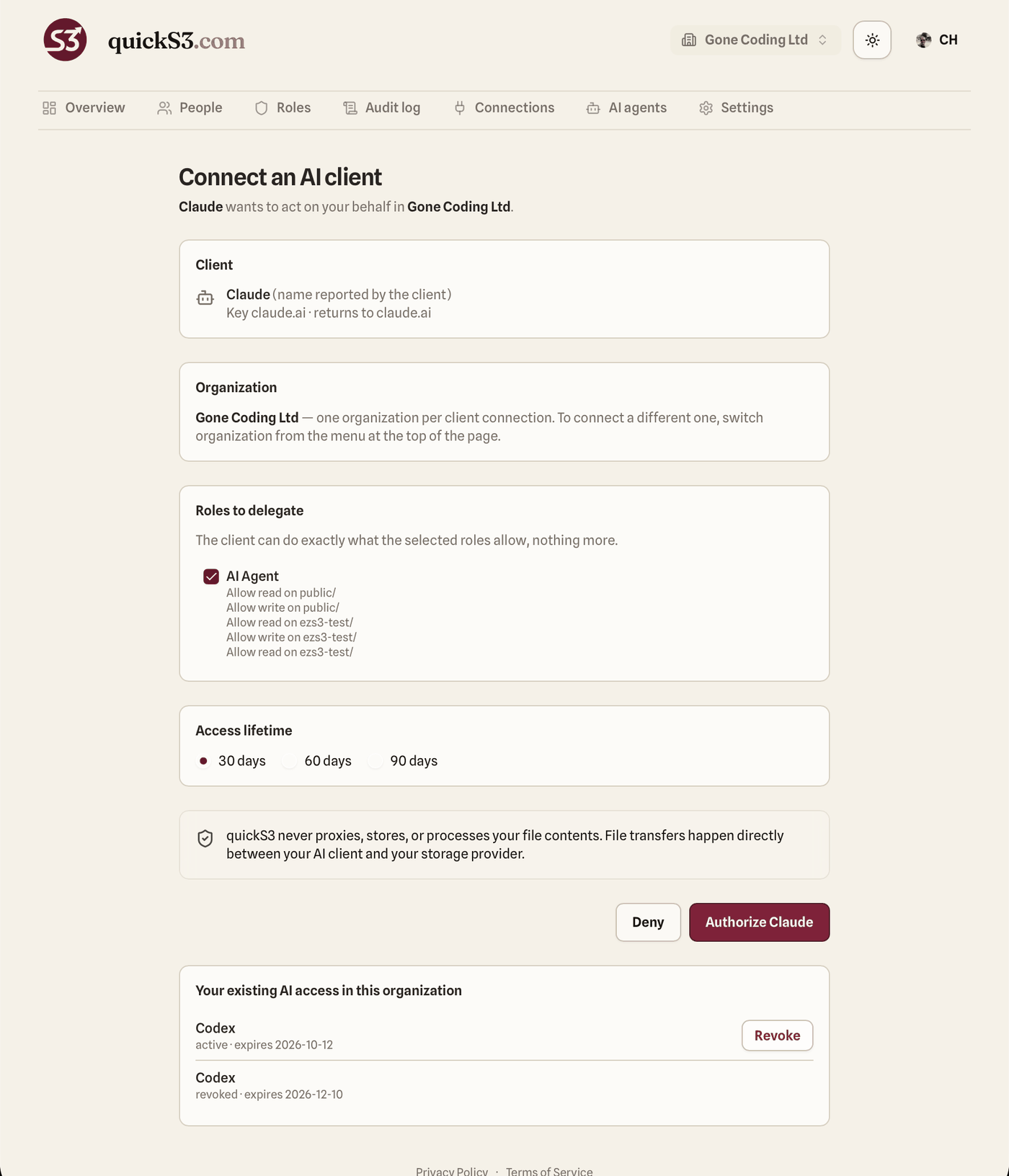
Security model
What the agent can and can't do
quickS3 is the control plane: it signs the agent in, checks permissions, and issues links. Your storage provider stays the data plane.
Roles, not keys
The agent borrows your access through the custom roles you pick on the consent page. Owner and Admin can't be delegated, and the deny rules from all your roles still apply. An agent can never get more access than you have.
Checked on every call
Each tool call re-checks the grant, your membership, and the current role rules. Edit a role and the agent follows on its next call. Take the role away from yourself and the agent loses it too.
Direct transfers
Downloads use a short-lived quickS3 link, valid 5 minutes and up to 5 uses, that redirects to a 60-second provider URL, so the provider URL never lands in the chat. Uploads use a presigned URL valid 15 minutes. quickS3 never proxies, stores, or processes file contents.
No delete, no silent overwrite
There is no delete, copy, move, or rename tool. An upload fails if the file already exists, unless the agent asks to overwrite and its role allows writing there.
Audited and revocable
Agent actions appear in the audit log tagged as agent activity, next to the person who approved the agent. Revoke a grant on the AI agents page and the next call fails, including download links it hasn't used yet.
Access that expires
Every grant expires after 30, 60, or 90 days. Each client gets its own grant, so Claude Code and Codex can have different roles and lifetimes.
Tools
Six tools, all checked against your roles
| Tool | What it does | Role needs |
|---|---|---|
list_connections | Lists the storage connections the grant can use, with their buckets | Read or write |
list_buckets | Refreshes the buckets on one connection the grant can use | Read or write |
list_objects | Lists one folder level, filtered to what the roles allow, paginated | Read |
create_download_link | Creates a download link, valid 5 minutes, up to 5 uses | Read |
create_share_link | Creates a public link for someone without a quickS3 account, valid 5 minutes to 30 days | Read and Share |
create_upload_url | Creates a presigned upload URL, valid 15 minutes, with no overwrite by default | Write |
Write access doesn't imply read. A role that only allows uploads can find its target buckets but can't list or download what's inside them.
Large files
Files stay out of the context window
A tool result is text the model has to read. Returning a video or a big spreadsheet as base64 fills the context window and often fails. quickS3 tools return links instead. The agent downloads or uploads with a plain HTTP request, and the file goes straight between its machine and your bucket. The conversation only carries the link.
# Download: follow the link from create_download_link
curl -L -o report.pdf "<download link>"

# Upload: PUT the file to the URL from create_upload_url
curl -T report.pdf "<upload URL>"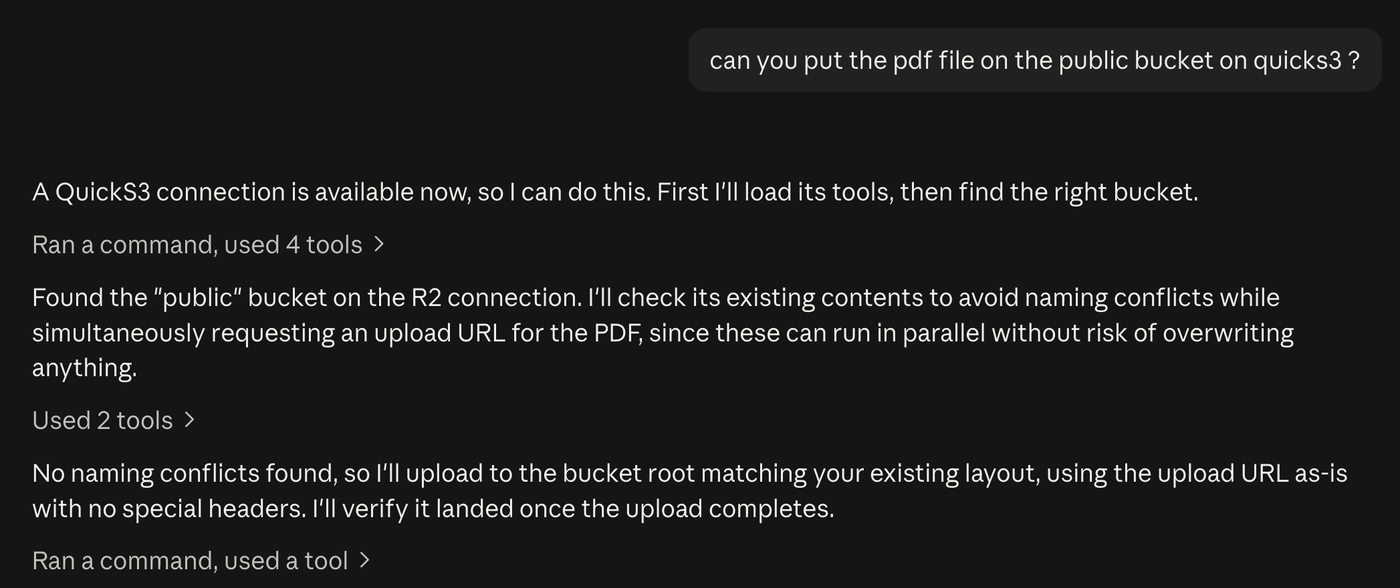
One MCP server for all your storage
Every storage connection in your quickS3 organization is reachable through the same endpoint, so one agent can read from S3 and publish to R2 in the same task. Setup guides for each provider:
- AWS S3
- Azure Blob Storage
- Backblaze B2
- Cloudflare R2
- DigitalOcean Spaces
- Google Cloud Storage
- MinIO
- Wasabi
- Oracle Object Storage
FAQ
Questions about the S3 MCP server
Do I have to give the agent my AWS access keys?
No. Your storage credentials stay encrypted in quickS3. The agent signs in with OAuth in your browser and gets a token tied to the roles you pick. There is no key to paste into a config file and nothing to leak from a laptop.
Can I give an agent read-only access?
Yes. Delegate a role that only allows read. Roles are the only control: there is no separate agent switch, so the agent can do exactly what the delegated roles allow, down to a single folder.
Can the agent delete files?
No. The quickS3 MCP server has no delete, copy, move, or rename tool. Uploads also refuse to replace an existing file unless the agent explicitly asks to overwrite and its role allows writing there.
Does quickS3 see my files?
quickS3 lists object names and hands out short-lived links. The file bytes move directly between the agent and your storage provider. quickS3 never proxies, stores, or processes file contents, and never returns them in an MCP response.
Which AI clients work with it?
Claude Code, Codex, ChatGPT custom connectors, and the Claude app on the web, on desktop, and in Cowork. Any client that supports remote MCP servers over Streamable HTTP with OAuth sign-in should work. To download or upload, the client must be able to run a command such as curl. In a chat-only client the agent can still browse your folders and create share links.
Is there a plugin for Claude Code and Codex?
Yes. The quickS3 plugin is open source (MIT) at github.com/QuickS3-com/skill. It installs the MCP server and the quicks3-operator skill, which teaches the agent to list folders narrowly, download through short-lived links, and upload without overwriting by default. The skill is a plain SKILL.md, so you can also copy it into any agent that reads skills.
Which storage providers are supported?
AWS S3, Cloudflare R2, Backblaze B2, DigitalOcean Spaces, Wasabi, MinIO, Azure Blob Storage, and other S3-compatible services. One MCP server covers every storage connection in your quickS3 organization.
How do I cut an agent off?
Revoke its grant on the AI agents page in quickS3. The next call fails, and so do download links it hasn't used yet. A provider URL that was already handed out stays valid for at most 60 seconds.
What does it cost?
The Team plan is $19/month for up to 10 users, then $2 per user, with a 14-day free trial and no credit card required. Agents never count as users.
Give your agent a bucket, not your keys
Sign in, connect a bucket, create an agent role, and point your client at the MCP URL. 14-day free trial, no credit card.